How Connection Leasing and LHC Works?

After XenApp 6.5, Citrix does not use the IMA data store as the central database to store configuration information. Instead, it uses a Microsoft SQL Server database as the data store for both configuration and session information. Microsoft Access and Oracle are no longer supported. Terminal Services (Remote Desktop Services) is no longer required on servers running the Controller, however Terminal Services Client Access Licenses (TS CALs) are still required. There is no Farm, Zone and dedicated zone master. The Controller is responsible for user connection requests and communication with hypervisors and this function is distributed evenly across all Controllers in the Site.

Citrix Independent Management Architecture, IMA got replaced by Flexcast Management Architecture, or FMA. There are some functionality and features which FMA doesn’t have in XenApp 7.5. Some wonderful and really useful features like Sessions Lingering, Anonymous access, Pre-Launch and some few more were missed. But Citrix has again brought back some of the most popular features of XenApp 6.5, again in its latest XenApp 7.6, and of course not all. In Flexcast Management Architecture (FMA) we should be in a domain to deploy a Site. To install the Citrix servers, we must be a local and Domain Administrator.

The Connection Leasing (CL) feature enhances the SQL Server high availability best practices by enabling users to connect and reconnect to their most recently used applications and desktops, even though the database is not available. Connection leasing is supported for server-hosted applications and desktops, and static (assigned) desktops; it is not supported for pooled VDI desktops. Connection Leasing only caches assigned or personal resources. If you have a desktop assigned to you personally and SQL database goes down, it works as normal. The applications being used on a daily basis will continue to work with CL and the same applies to assigned desktops.

With Connection Leasing enabled and active, load management within the Site may be affected. Server-based connections are routed to the most recently used VDA. Load evaluators may be exceeded. With both FMA and IMA, when the Database is down the Administrator cannot use Citrix Studio to make any configuration changes in the Site.

How Connection Leasing Works?

Connection Leasing supplements SQL high availability. With Connection Leasing enabled, each Controller caches the users’ connections to their recently used applications and or desktops. This is under ‘normal’ circumstances with the SQL database being available. So when the Database is online, Connection Leasing does not help in application enumeration process and creation of new sessions.

The leases generated on each Controller are uploaded to the Site database for periodic synchronization to other Controllers on the Site. The Controller’s cache holds application, desktop, icon, and worker information. The lease and related information is stored on each Controller’s local disk. If the database becomes unavailable, the Controller enters leased connection mode and “replays” the cached operations when a user attempts to connect or reconnect to a recently used application or desktop from StoreFront.

By default connections are cached for a period of 2 weeks. So when the database becomes unavailable, everything that the user has launched within a two week period prior to the time database becoming down will be available from the CL cache and it applies to the server-hosted applications and desktops, and static desktops only. Pre-launch will not work and will affect load-balancing as it does not even require the Controller. It will continue to work indefinitely but Site configuration changes are not possible.

How Local Host Cache Works?

Each XenApp server holds a local copy of the IMA data store. By default, a XenApp server polls the central data store through the local IMA service every 30 minutes and the information is stored into a local (Access) database which is referred to as the Local Host Cache (LHC). When any configuration changes are made within the Farm the Zone Data Collectors will be notified and they update their LHC. Then Collectors will notify their Zone member servers to do the same. So when the IMA Store isn’t reachable, the users can continue to work, logon, logoff etc. Also the server can be rebooted while the IMA store is down and the local IMA service will start from the LHC without any issues. The Local Host Cache stores all the basic information like, published applications and their properties, the Windows network domain trust relationships within the farm, product code and the license information of the Farm.

When the Database is online, the LHC helps in speedup the application enumeration process and creation of new sessions like application availability, zone preference policies and zone fail over policies.
When the Database is offline, the LHC will provide the information about the published application, Workspace control and hosted shared desktops. pre-launch will continue to work and does not affect load-balancing. It will continue to work indefinitely but only that Farm configuration changes are not possible and the administrators won’t be able to start up any management consoles.

Posted in Citrix, Citrix XenApp | Tagged , , , , , , , , , | Leave a comment

Components of Citrix StoreFront Server

1. Authentication service: This service, which is an integral part of StoreFront, authenticates users to XenDesktop and XenApp farms.

2. Store: The store retrieves user credentials from the authentication service and provides resources to the to authenticated users. The store also enumerates and aggregates the resources currently available from XenDesktop and XenApp farms. Users access the store through Citrix Receiver or a Receiver for Web site.

3. Application Subscription Store (Data Store): This store saves and indexes the application or desktop subscriptions of the users on a per-StoreFront Store basis. In contrast to older versions of StoreFront, where an external Microsoft SQL database was required, the new Application Subscription Store uses the built-in Microsoft Windows Extensible Storage Engine to store details of users’ app subscriptions locally on StoreFront servers. When joining a StoreFront server to a StoreFront Server Group the replication of data between all members is configured automatically.

4. Receiver for Web site: This site enables users to access stores through a webpage. It verifies the Receiver version installed locally on the client computer and guide the user through an upgrade or installation procedure if required. If Receiver cannot be installed locally, Receiver for HTML5 can be enabled for the Receiver for Web sites so that users can access resources directly within HTML5-compatible web browsers.

​Citrix Receiver uses beacon points (web sites) to identify whether a user is connected to an internal or external network. Internal users are connected directly to resources while external users are connected via Citrix NetScaler Gateway. Citrix Receiver continuously monitors the status of network connections. When a status change is detected, Citrix Receiver will first check that the internal beacon points can be accessed before moving on to check the accessibility of external beacon points. StoreFront provides Citrix Receiver with the http(s) addresses of the beacon points during the initial connection process and provides updates as necessary

In the above picture, the StoreFront resides in the secure, internal network. NetScaler Gateway is installed in the DMZ and authenticates user requests before sending the requests to the StoreFront. The StoreFront does not perform authentication, but interacts with the STA and generates an ICA file to ensure that ICA traffic is routed through NetScaler Gateway to the proper server. For small installations this is the default deployment scenario important note: When the StoreFront is located in the secure network, authentication should be enabled on NetScaler Gateway, otherwise unauthenticated HTTP requests are sent directly to the server running the StoreFront. Disabling authentication on NetScaler Gateway is recommended only when the StoreFront is in the DMZ and users connect directly to the StoreFront

Refer this for Load Balancing the Citrix StroreFront

Posted in Citrix | Tagged , , , , , , , , , , , , , , , | Leave a comment

Citrix StoreFront logon process

Once the user enters the credentials the authentication service of StoreFront fetches the user credentials and validates them with a domain controller. So the StoreFront servers must reside either within the Active Directory domain containing the user accounts or within a domain that has a trust relationship with the user accounts domain.

StoreFront checks the Datastore for existing user subscriptions and stores them in memory.

wisf

The Web Interface / StoreFront forwards the user credentials as part of a XML query to the backend systems, such as XenApp, XenDesktop, App Controller or VDI-in-a-Box sequentially.

The Citrix Delivery Controller validates the user credentials with a domain controller and checks which resources have been published to the user within its database.

The Citrix Delivery Controller sends an XML response to Web Interface / StoreFront which contains all resources available for the user from the Citrix site.

StoreFront sends the list of available resources and the existing subscriptions to the Citrix Receiver installed locally or displays them in Receiver for Web and the user can access the resource.

StoreFront 2.5 supports parallel resource enumeration. When enabled, StoreFront sends out enumeration requests to all farms/sites at the same time and aggregates responses when all farms/sites have responded. This should provide faster responses to user queries when aggregating multiple farms/sites. If explicit Active Directory credentials are used to authenticate users, StoreFront sends user credentials to the XenApp farms/XenDesktop sites. To minimize the risk of user accounts being locked out as a result of parallel enumeration, StoreFront validates user credentials with Active Directory immediately before sending out enumeration requests.

When user clicks on an application or desktop icon to launch it in Citrix website, a spinner is displayed and any clicks on the same icon are ignored while the spinner is spinning. Hence user cannot unintentionally launch multiple instances of the same application/desktop. The default time period for the spinner is fixed for three seconds and can be changed by editing custom.script.js in the contrib folder under the Receiver for Web site.

Posted in Citrix | Tagged , , , , , , , , , , , | 4 Comments

Citrix Command Center

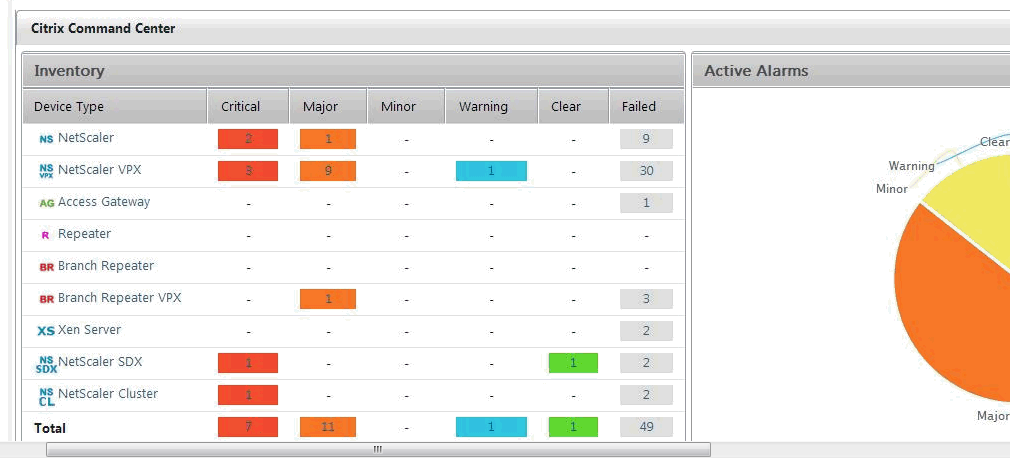
The Citrix Command Center (Monitoring Tool), which was available only for Enterprise/Platinum Licenses, are now available for free from 24th September 2014 onwards.

Citrix Command Center

Citrix Command Center is a management and monitoring solution for Citrix application networking products that include Citrix NetScaler, AppFirewall, CloudBridge, Netscaler Gateway, Citrix AGEE and Citrix Branch Repeater. Command Center enables network administrators to manage, monitor, and troubleshoot the entire global application delivery infrastructure from a single, unified console. This centralized management solution simplifies operations by providing administrators with enterprise-wide visibility and automating management tasks that need to be executed across multiple devices.

Posted in Citrix | Tagged , , , , , , , , , | Leave a comment

Anonymous Authentication in Citrix StoreFront

Web Interface was written in J# and Microsoft announced end of life for J# by June 2015 . As the result StoreFront has been developed from scratch using more flexible and powerful framework than Web Interface that enables StoreFront to provide next generation features, such as:

  1. Unified StoreFront for XenApp and XenDesktop resources that can also deliver SaaS & Native Mobile applications i.e., through App Controller.
  2. Simplified Account Provisioning – which enables users to connect to assigned desktops and applications by simply entering their email or server address, or by opening a Provisioning File in Receiver
  3. Access from any Receiver with a consistent user experience.
  4. Synchronization of resource subscriptions across all platforms and devices.
  5. Cross-farm aggregation and de-duplication, that aggregates and delivers a unique set of applications from multiple farms across different sites
  6. Farm-Based Optimal HDX Connection Routing, which enables the use of the nearest NetScaler Gateway for HDX traffic routing independent of the NetScaler Gateway used for initial authentication

From XenApp 6.5 we have the feature of anonymous user access to XenApp sites and StoreFront v 2.5 supports users to log into Citrix Receiver without Active Directory user credentials, but rely on a combination of network security and authentication within the application itself. In simple, it allows unauthenticated users accessing application instead of AD accounts.

When an unauthenticated resource is launched, XenApp uses a pool of local user accounts to host the user’s session.  The session has a default idle timer of 10 minutes, and session reconnection and roaming are not allowed.  One the session logs off, the user account is returned to the pool to be used by another connection.

Configuring unauthenticated access requires two steps:

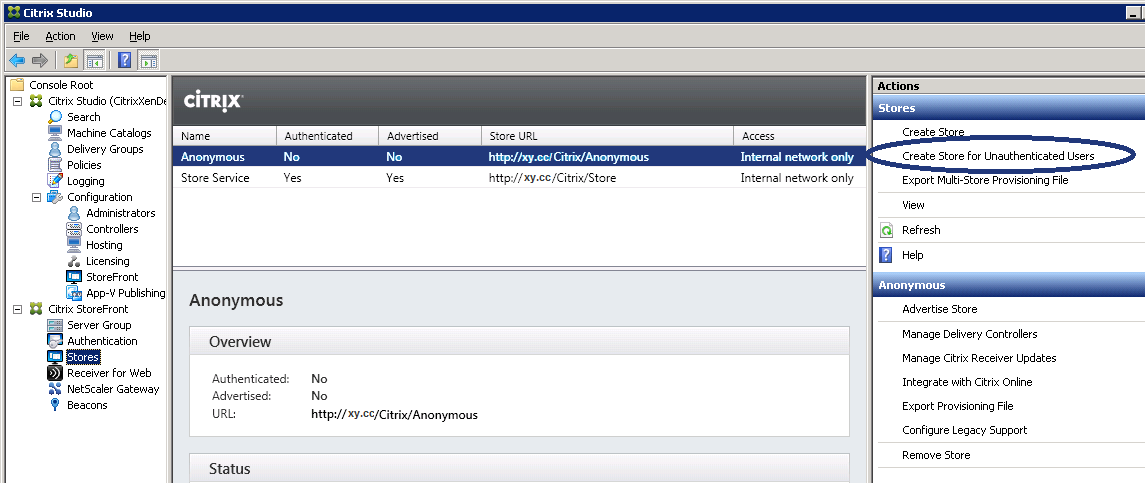
  1. Creating a StoreFront store for unauthenticated users
  2. Publishing unauthenticated apps and desktops in XenApp

Creating an unauthenticated site is simple. In top of the “Stores” tab, click the “Create Store for Unauthenticated Users” and follow the wizard to create a new store.

storefront-anonyConf

Then configure Receiver to use the anonymous store, or simply access XenApp Web URL. The users are directly taken to the list of apps, skipping the logon screen and the list of all available resources is shown automatically and also there is no concept of subscribing to apps.

Posted in Citrix, Citrix XenApp, Citrix XenDesktop | Tagged , , , , , , , , | Leave a comment